Performing an analysis on whole-genome or exome sequencing data requires a series of steps that almost systematically include quality control, sequence alignment and some kind of variant calling and annotation. For each of these steps, a number of well-established and regularly-updated tools exist, with new ones being released all the time. It is left up to the researcher to explore each of these and find the best fit for a given analysis. Today we will use BWA for alignment, Samtools for variant calling and Picard for duplicate removal. Filtering will be performed using the online version of ANNOVAR which will allow us to extract valuable data from various large databases without needing to download any of them. It is important to stress we could have also used Bowtie2 for alignment, GATK HaplotypeCaller for variant calling and GEMINI for annotation. We strongly encourage participants to evaluate other existing options in their own time.
The Human Genome Reference is a crucial part of any human-centred sequencing analysis. It is required for alignment and variant calling and (to some degree) annotation.
In this class, we will use the latest version: HG38.
(note: many existing studies still use HG19. If working from existing data, always check the version against which reads were aligned)
The human genome is a relatively big file, so let's download it now!
Go to: UCSC Genome Browser portal downloads > Humans > hg38 > Full data set > hg38.fa.gz
Save the genome reference in your working folder today for ease of access. You can use wget [LINK] to download it directly from the command line.
(note: the file extension should be '.fa.gz', you can unzip the fasta file using gunzip but if you merely wish to inspect it, less will do!)
Later, we will need the human genome reference for sequence alignment (more on that later...) which requires us to compress the reference into an FM-index. This takes a while (>40 mins on a personal computer), so it is better to start now...
Only underline the blue box once you have tried to work out an answer yourself and want to check it. When you are ready, run bwa
bwa index hg38.fa.gz
(hint: for available bwa commands, check the documentation or type bwa in the command line, followed by nothing)
For this step, we will download a pair of 'small' FASTQ files, each containing either read of various pairs (i.e. paired-end reads with IDs ending in :1 and :2).
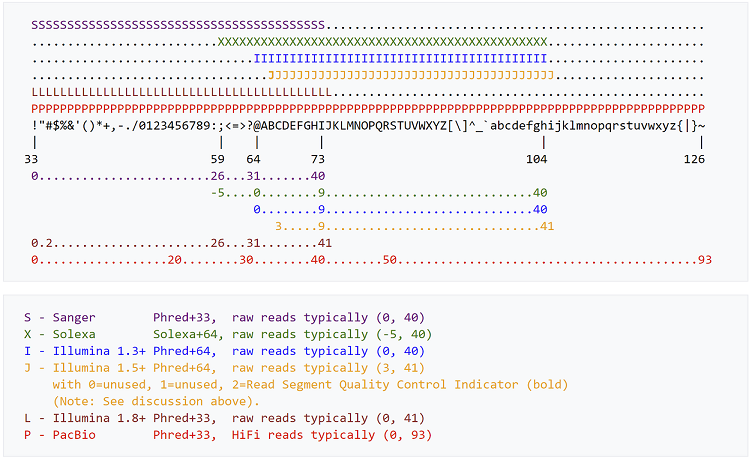
Here is the guide mentioned earlier:
If you're still stuck, consider this: do Phred+33 and Phred+64 strictly use the same ASCII characters?
We've previously mentioned FastQC and PRINSEQ. Another tool that provides NGS quality control is NGS QC toolkit. How does it compare to FastQC? Let's take a look.
Do not worry if you are not able to complete this section before the end of the morning session. It is more important that you start the next section if the afternoon session has begun. You can always return to this section later.
Various tools exist for fast alignment, each with its own strengths and weaknesses. For this practical we will continue to use bwa (Burrows-Wheeler Aligner).
We already downloaded the HG38 reference this morning and created a compressed version of it (an FM index, notice the .amp , .ann , .bwt , .pac , .sa files in your work directory).
Only underline the blue box once you have tried to work out an answer yourself and want to check it. When you are ready, run bwa
In the previous section, we generated a SAM file, which is an alignment (to HG38) of our reads. We now want to compress our file to save up hard disk space and prepare it for variant calling. For this, we use Samtools .
For this afternoon session, answers will not be provided, although hints can be given. The best way to find out if your answer is correct is to run samtools/picard and see what happens. I will gladly provide answers by e-mail after the end of the course if needed: miossec@well.ox.ac.uk
You now have a VCF file that you can run through wANNOVAR for further annotation and filtering. Using the default parameters, submit your VCF file for annotation.
The result should be a .csv type file which you can open in Excel or equivalent or in your terminal if you're comfortable with awk, grep and/or sed.
You may now explore how different options leads to shorter manageable lists from which we can derive hypotheses. Use the remaining time today (if any) to explore some of the databases used by wANNOVAR and touched upon briefly this afternoon.